Use Cases
Use cases that adapt to your business needs
Flexibility to support any use case
The TSANet Connect Platform is designed to allow Members to support any Partner use case. The features below provide the functionality to quickly setup any type of Partner collaboration.
Partner Groups
Groups are a collection of 2 or more Partners. The group defines the high-level process requirements such as SLA response times and requirements for joining the group. An efficient onboarding process simplifies adding Partners.
Process Forms
Process forms define the data needed to intake a request into your support process. More than one process form can exist allowing Members to define specific requirements for each Partner Group
Departments
Departments link Partner Groups and Process Forms. This allows a Member to view the separate available processes in the search.
The Chart below shows and overview of common use cases. See Technology Partner Framework for more detail.
Collaborative Support
Dual Customer entitlement - standard process
Default model. Linked to customer case
Solution Support
Streamlined Customer entitlement
Streamlined entitlement. Can be linked to customer case or solution specific workflow
OEM Support
Partner level entitlement
Case Linked to Partner
Service Providers
Partner level entitlement
Case Linked to Partner
Critical Escalation
Streamlined Customer Entitlement
Stremlined entitlement - linked to existing case or incident
Uses Case detail
Collaborative Support
Available to all TSANet Members
Collaborative Support is used when Members collaborate on common customer issues based on dual entitlement. Both Vendors support the Customer, and collaboration happens when a single Vendor cannot solve the problem.
Example 1: A customer has a problem with your product in a multi-vendor environment. The problem started after the customer updated the software for Member B’s product. Member B's support needs to help understand what changes were made and whether that is causing the problem
Example 2: A customer is having problems installing your product in a multi vendor environment. It appears to be an issue with Member B’s software. The problem is not clear, and help is needed from Member B to isolate it.

Solution Support

Solution Support provides support for Solutions that contain multiple vendor products. Joint Solutions are marketed and sold to the customer as a complete package with support. For Solution Support the end customer maintains a relationship with both Vendors. The Solution support model is flexible and can support any of the following.
Warm Transfer from Vendor A to Vendor B (Example RMA this hardware)
Joint Troubleshooting (Example Compatibility issues)
Critical Escalation (for high business impact issues)
The Steps to enable Solution Support are below:
Contact TSANet for the steps below
TSANet will Create a group with the Vendor(s). Set details such as SLA response times
TSANet will Create a process form to support any data needed to support the product support request
The process supports streamlined entitlement between Vendors
This process is then mapped to a department, providing a path to the Group and Process
Each system links the request to customer case (or escalation case)
OEM Support
Available for Elite TSANet Members
TSANet Connect can Support an OEM relationship where Vendor A is responsible for Customer Support and escalates Product Issues to Vendor B. In this model Vendor A takes full responsibility for Customer Support and escalation of product issues are sent to Vendor B. In this model the process form does not need to include customer entitlement information. The interface between organization can be with Support or Engineering:
Vendor A (Support) --> Vendor B (3rd Level Support)
Vendor A (Support) --> Vendor B (Engineering)
Service Partner Model (Service Partner takes first line support and escalates to Vendor as needed)
The Steps to enable OEM & Service Provider Support are below:
Contact TSANet for the steps below
TSANet will Create a group with the Vendor(s). Set details such as SLA response
TSANet will Create a process form to support any data needed to support the product support request
This process is then mapped to a department providing a path to the process-group
Workflow is based on OEM model. downstream vendor creates case against entitled OEM Partner
Service Providers
Available for Elite TSANet Members
TSANet Connect supports a Service Provider relationship where the Service Provider is responsible for part of the customer experience. Below are some examples:
Managed Service Provider: In this model, the Service Provider is responsible for Customer support and escalates technical issues to the Vendor. The Vendor may also provide other services, such as software upgrades.
Service Provider --> Vendor(s) (Technical Support)
3rd Party Maintainers: In this model, a 3rd Party maintainer can function as the front end or as a part of an overall customer experience (example: hardware replacement).
Service Provider --> Vendor(s) (Technical Support)
Vendor --> Service Provider (Hardware replacement request)
The Steps to enable OEM & Service Provider Support are below:
Contact TSANet for the steps below
TSANet will Create a group with the Vendor(s). Set details such as SLA response
TSANet will Create a process form to support any data needed to support the product support request
This process is then mapped to a department providing a path to the process-group
Workflow is based on relationship with the Service Provider. For MSP example the Vendor often creates the case against the Partner as the customer relationship is managed by the MSP
Critical Escalation
It provides members a direct path to members’ peers where traditional escalation processes do not support a critical customer situation. This process follows the standard collaboration request process found within the TSANet Connect system. Select users for the Member company have access to create a Critical Escalation collaboration request and Members have the flexibility to configure inbound requests to flow into their existing critical escalations workflow.

Internal Process Best Practices
Members with products and services that are part of their customers critical business processes have implemented a “Critical” escalation process to address the most urgent customer issues. Below are best practices that are found within our Members’ internal Critical Escalations process.
Have a standard escalation process that works well and is visible to customers
Have a designated team that works “Critical” Escalations that is available 7*24*365
Have a clear process to designate a “Critical” escalation that is based on their customers’ “Business Impact”
Is a Company level process with authority to assign resources from any team
Has executive support – “This team is the right hand of our CEO”
Has the ability to collaborate with other Vendors (TSANet Critical Escalations Collaboration)
Before onboarding to the TSANet Critical Escalations Collaboration, a Member must have a working internal Critical Escalations process.
TSANet Connect User Experience


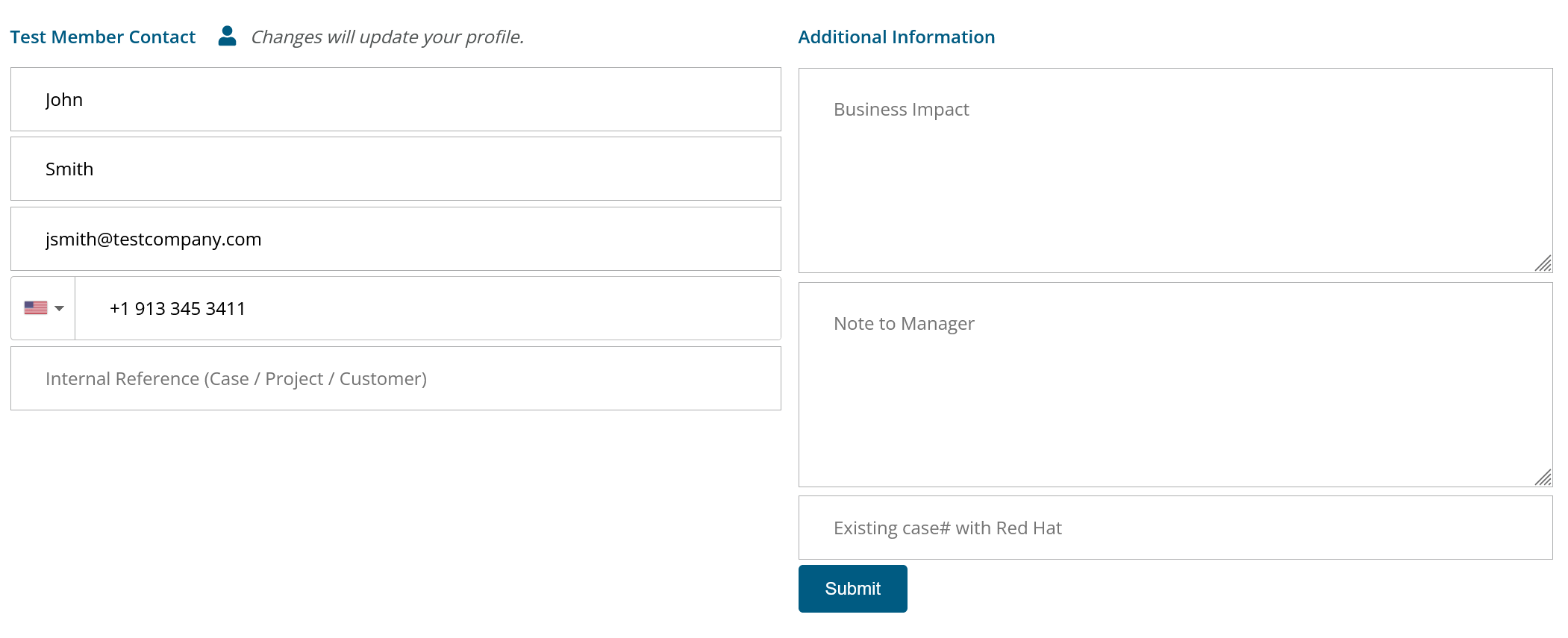
Business Impact and Note to Manager Examples
Example 1:
Business Impact: Bank of Test is experiencing a Production Down event that is impacting multiple regions. 50% of transactions are failing
Note to Manager: We have a bridge that is open. Please assign someone to join at https://zoom.com/someID/somepass
Example 2:
Business Impact: Test Hospital is experiencing an outage to the wireless network for the Hospital. This is affecting all users within the facility.
Note to Manager: The outage appears to be a result of a change to the firewall firmware. Please contact our lead engineer who is on-site on 225-555-1212.
TSANet Collaboration Setup
Working with TSANet Staff, your company will be onboarded to this special group by setting up outbound access to your team and creating an inbound process.
Set access levels to Critical Escalation Team Members:
As an administrator, you can go under the admin menu and select the Critical Escalation group to manage access. See screen shots below:


Configure Inbound Process:
The inbound process has the same configuration and capabilities of your primary inbound process. This process must be designed to route the collaboration request immediately to your Critical Escalations team. For information on setting up inbound processes see:
Inbound Process Best Practices
TSANet Collaboration Best Practices
The following best practices must be followed by Members participating in this group:
Manage access so that only members of your Critical Escalations team have access to make a collaboration request
Ensure that you collect the Business Impact from the customer and the Existing case# that they have open with the vendor you need to collaborate with
Design your inbound process to work 7*24*365 with a 2-hour SLA
For questions on this feature Contact Us
Last updated